
In July 2026, we noticed that several WordPress sites we manage were showing visitors a new Cloudflare-style “Verify you are human” box. We confirmed it was a ClickFix attack: the fake check tried to trick visitors into installing password-stealing malware on their own computers.
Attacks like these are getting easier to set up. According to the Cyber Security Agency of Singapore’s (CSA) Singapore Cyber Landscape 2025/2026 report, released in June 2026, the growing use of AI in cybercrime lets attackers set up and launch attacks more quickly. The report also notes that the number of infected systems in Singapore is rising, mainly because of Malware-as-a-Service (MaaS), which lets attackers rent and deploy malware they haven’t built themselves. So it’s no surprise to see the same ClickFix attack turning up on a string of completely unrelated WordPress sites.
Rapid7 has documented this campaign since December 2025, and Singapore is on its list of affected countries. Rapid7 found that the affected sites didn’t share a particular plugin or WordPress version, so being “up to date” isn’t enough.
Here’s what we learned while fixing it.
What the fake popup looks like
It copies the look of a real Cloudflare check: logo, checkbox, “Verify you are human”. When the visitor clicks, it asks them to do something no real CAPTCHA ever asks for: leave the browser and press keys.
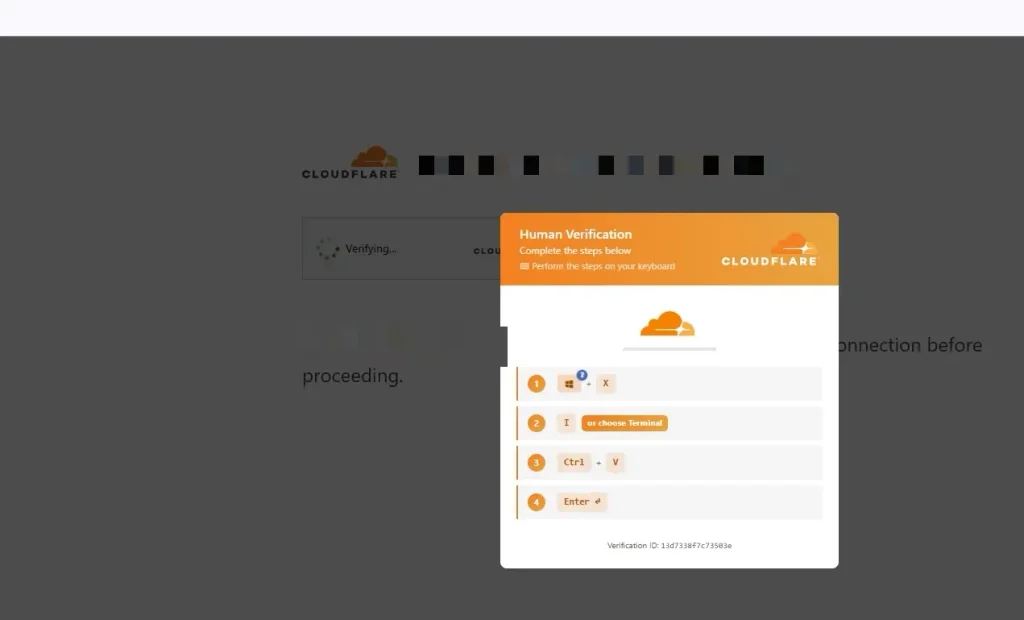
Windows version:
- Press Win + X
- Press I (or choose Terminal)
- Press Ctrl + V
- Press Enter
Older versions used Win + R (the Run box). CSO Online reports that a campaign Microsoft spotted switched to Windows Terminal via Win + X.
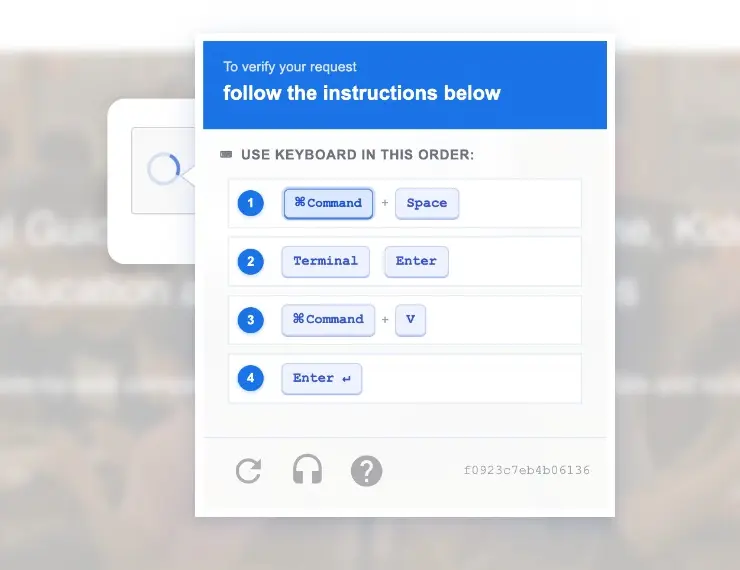
Mac version (we saw this too):
- Press Cmd + Space
- Type Terminal, press Enter
- Press Cmd + V
- Press Enter
What it actually does
When a visitor clicks the checkbox, the page quietly copies a malicious command to their clipboard. The “verification steps” then get them to paste that command into a terminal or console and run it, so the visitor never realises they’ve run harmful code on their own computer.
On Windows, Rapid7 found that the command starts a chain that runs almost entirely in memory. It ends by loading an info-stealer, including a newly identified version of Vidar stealer that targets credentials and crypto wallets. A related ClickFix campaign tracked by GoDaddy’s security team delivered stealers such as Vidar and Lumma to visitors’ computers, and GoDaddy notes that Vidar is known to steal cPanel and WordPress credentials. That means the malware can go after saved browser passwords, login cookies, crypto wallets and even logins to other websites.
That’s what makes it so nasty: one infected visitor with the right logins saved is all it takes for more websites to get hacked.
Why site owners can’t see it
This is why many site owners first say, “I checked my site and it looks fine.”
The injected script pretends to be a “performance optimiser” and only runs in browsers that don’t have a WordPress logged-in cookie. So the site owner, who is usually logged in, sees nothing unusual, while ordinary visitors walk into the trap. Some variants also skip known crawlers and WordPress admin pages, which makes the problem even harder for owners to spot.
In one case, the hosting provider’s support team tested the site by switching to a different theme, and the popup disappeared. That’s a fair diagnosis, but it isn’t a fix. Hosts will usually confirm there’s a problem, but they won’t remove the malware or find out how it got in.
How to check your own site in 60 seconds
- Open your site in an incognito/private window, with no admin cookie. Click around a few pages.
- Check on your phone using mobile data, not office Wi-Fi.
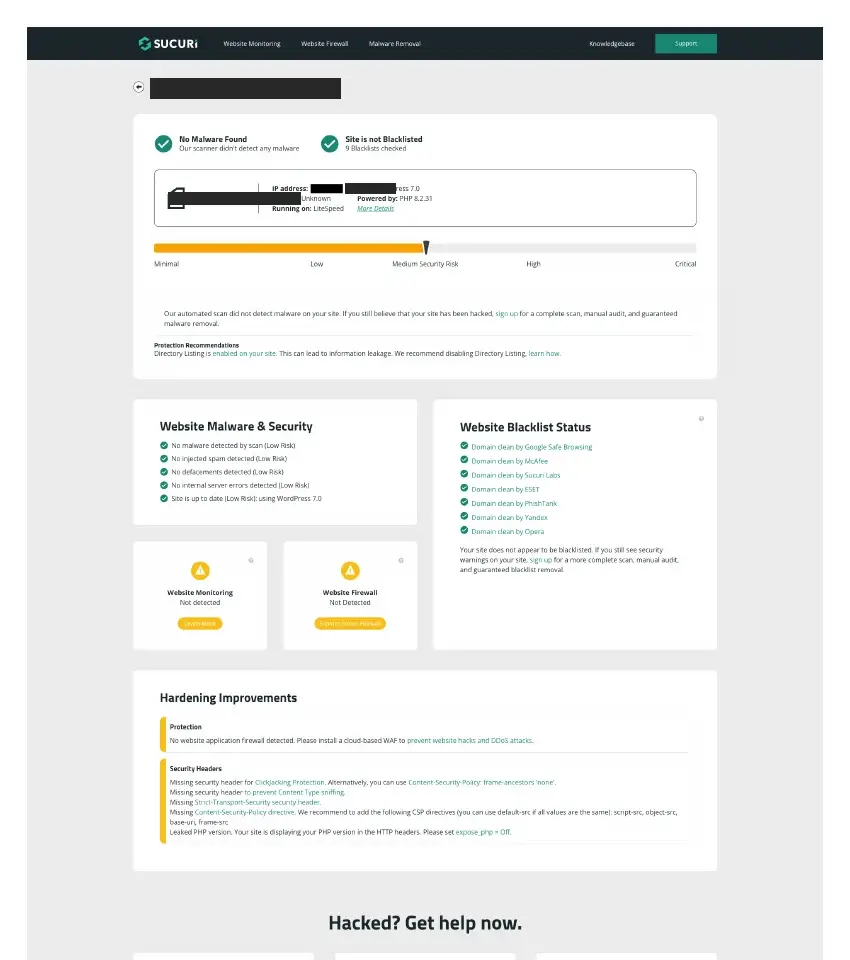
- Run a free scan at Sucuri SiteCheck. It looks at your public pages and blacklist status.
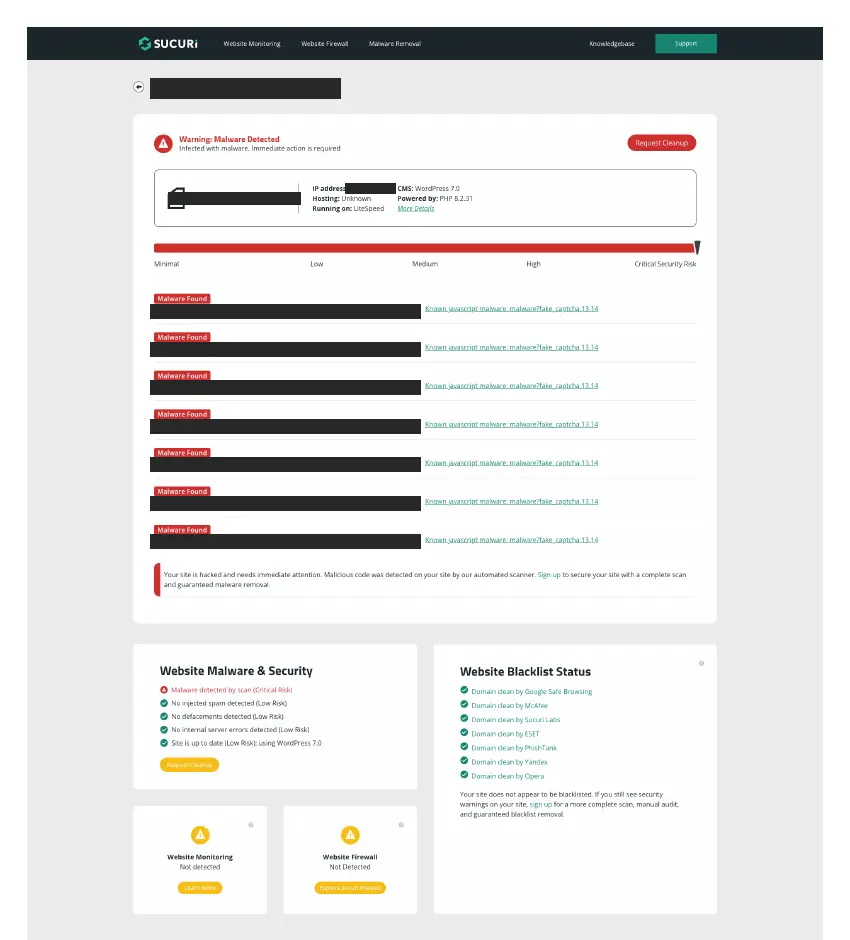
If any of these shows the fake popup or flags malware, assume the site is compromised and move to containment.
A note on real CAPTCHAs: a plain “I’m not a robot” checkbox on your login page can be completely legitimate. Many login-protection plugins add one.
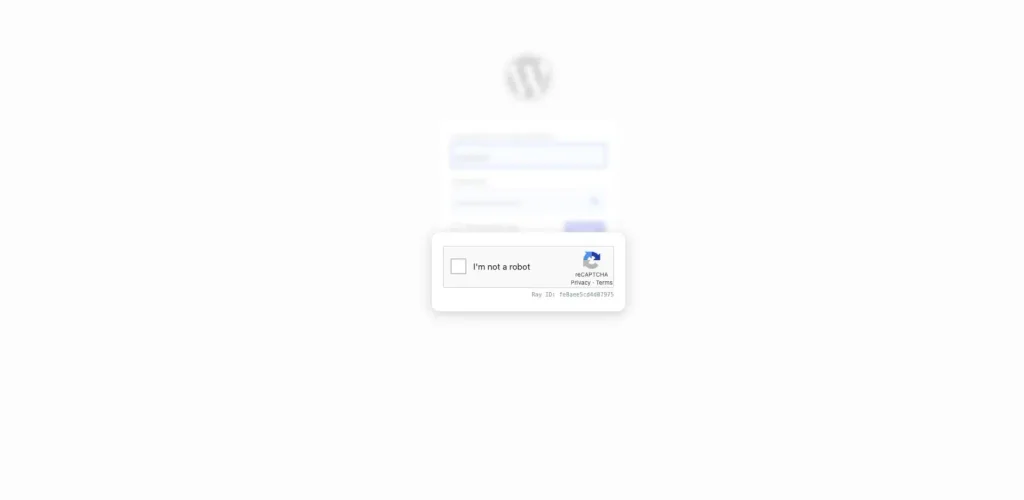
The tell is never the checkbox itself. It’s any request to leave the browser or press keyboard shortcuts.
Immediate containment for site owners
Do these first, today:
- Tell your team and anyone who reported the popup: don’t complete it. If they already did, act now.
- Any computer that ran the command: disconnect it from the network and get it checked or reimaged. Treat every password saved on it as stolen.
- Change your passwords from a clean device, not the infected one:
- WordPress admin accounts
- Hosting / cPanel
- FTP / SFTP
- Database password
- Log everyone out (revoke sessions). Stolen login cookies can let attackers in without your password or 2FA code, so changing passwords alone isn’t enough. Changing the WordPress security keys (salts) forces every session out.
The full cleanup process
There’s a reason we treat this as a proper project rather than a quick fix. GoDaddy’s researchers found that in one ClickFix wave the attackers didn’t exploit any known WordPress vulnerability. They logged in with valid admin credentials, most likely stolen. Sucuri has also seen these infections come bundled with hidden backdoor plugins that let attackers back in after the visible code is removed. If you only delete the script, it tends to come back.
Our process:
- Scan with Wordfence and/or Sucuri, both server-side and remotely.
- Search for injected <script> code in header and footer settings, theme files (including functions.php), and the database, especially wp_options and wp_posts.
- Hunt for innocently named PHP files dropped by attackers, e.g. something like wp-cache-manager.php, and for unfamiliar plugins.
- Check wp_users for admin accounts you don’t recognise, and check the database directly too, because some backdoors hide users from the dashboard.
- Review recently modified files around the infection date.
- Remove everything malicious, then update WordPress core, plugins and themes, replacing them with clean copies where needed.
- Scan every site on the same hosting account. On shared hosting, an infected neighbour will simply reinfect a cleaned site. Sucuri gives the same advice: keep sites where they can’t infect each other.
- Harden: web application firewall (WAF), security headers, forced HTTPS redirect, directory listing turned off, PHP version hidden, and login protection (rate limiting, 2FA, CAPTCHA). We keep this up as part of our website optimisation work.
- Check Google Search Console → Security Issues. Sucuri notes that Google may show visitors a warning page on infected sites. Once the site is clean, request a review.
- Re-scan until you get “No malware found” and “Not blacklisted”, then keep monitoring.
If you’d rather not do this yourself, our hacked website recovery service covers the full process above, from containment to Google review.
Prevention: how to not end up here
Most of these attacks start with a stolen or reused password, not some clever exploit. The basics do most of the work:
- Use a password manager instead of saving passwords in the browser.
- Give every account its own password: WordPress, hosting, FTP and database should all be different.
- Turn on 2FA for WordPress admins and your hosting control panel.
- No shared logins. Each person gets their own account, which you remove when they leave.
- Put a WAF in front of the site.
- Keep core, plugins and themes updated, and delete what you don’t use.
- Use separate hosting accounts for separate sites, so one infection can’t spread.
If your site is old, bloated with plugins, or built in a way nobody wants to touch, patching it may cost more in the long run than a proper rebuild.
FAQ
Is the fake Cloudflare popup real?
No. Real Cloudflare checks never ask you to open Terminal, the Run box or any other app. If a “verification” tells you to paste and run something, close the tab. The site showing it has been hacked.
I pressed the keys. What now?
Disconnect that computer from the internet and have it checked or reimaged. From a clean device, change every password saved in that browser, log out of all sessions and turn on 2FA. Treat those logins as stolen.
Why did the popup disappear when I logged in?
The malware hides when it sees a WordPress login cookie. Owners see a normal site; visitors see the trap. Always check in an incognito window or on a phone using mobile data.
Can a normal “I’m not a robot” box on my login page be legitimate?
Yes. Login-protection plugins often add a plain checkbox on wp-login. The warning sign is any request to leave the browser or press keyboard shortcuts. Real CAPTCHAs never ask for that.
About The Director
Notable Achievements


Struggling to Attract More Traffic?
Let us help! We provide various digital marketing services that can easily rank your website on the first page of Google such as:
Allow your website to be seen by more users by scheduling an appointment with us today!